Barba.js turns a normal multi page site into one that navigates without full reloads. It intercepts clicks on internal links, fetches the next page, and swaps only the part you marked as the container, which gives you a moment between the two pages to play an animation. GSAP fills that moment: a leave hook animates the old page out (or a curtain in), Barba swaps the content, and an enter hook animates the new page in. Barba waits for each hook as long as it returns a promise, and a GSAP tween or timeline works as one.
What stays and what swaps. Mark the whole site with data-barba="wrapper" and the changing part with data-barba="container", plus a data-barba-namespace per page type. Anything outside the container, such as the header, the menu or a fixed curtain element, survives every navigation. That is what makes a transition read as moving through one site rather than loading a new one.
Cover or crossfade. A cover transition (a curtain, a grid of blocks, a drawn stroke) hides the swap completely: it animates in during leave, the content changes underneath, and it animates out during enter. A crossfade shows both pages at once, which needs sync: true so the old and new containers live side by side during the animation, and some CSS to stack them.
Which hooks.leave and enter cover most cases. once runs on the first page load, which is where the intro animation goes, and the beforeEnter and after hooks are the place to reset scroll, update the menu state and start the scripts of the new page.
A minimal version
A curtain transition. The page needs one fixed .curtain element outside the container, scaled to zero on the Y axis in CSS.
Because the curtain grows from the bottom and shrinks towards the top, it looks like a single sheet passing over the screen rather than one closing and opening in place.
Where it gets hard
Scripts on the new page. Barba does not run the scripts of the page it fetches. Anything that initialises per page (sliders, ScrollTriggers, SplitText, a video player) must be started from a hook, usually after or a view's afterEnter, and destroyed in beforeLeave. Forgetting the second half leaves ScrollTriggers pinned to elements that are gone, which shows up as wrong scroll lengths on the next page.
Scroll. By default the new page arrives at the old scroll position. Reset it while the curtain covers the screen, never after it has gone, or the reader sees a jump. With a smooth scroller such as Lenis, reset through the scroller and call ScrollTrigger.refresh() once the new content is in place.
The head. Only the container is swapped, so the title, meta description and canonical of the new page are not applied for you. Update document.title at least, and make sure every page still works as a full page load, since that is what search engines and shared links will get.
Links that should not be intercepted. Downloads, anchors, links to other sites and pages with very different layouts should load normally. Use prevent in barba.init or a data-barba-prevent attribute on those links.
Accessibility. After the swap, move focus to the new main heading and announce the change. Respect prefers-reduced-motion by skipping the curtain and swapping straight away.
Performance
The animation itself is light: a curtain is one or a few transformed elements. The risk is the fetch. If the network is slow, the curtain sits closed while the page loads, so keep it short and let Barba prefetch pages when links come into view with the @barba/prefetch plugin.
Variations in the library
Each one has a live demo and a validated AI prompt that rebuilds it in your project.
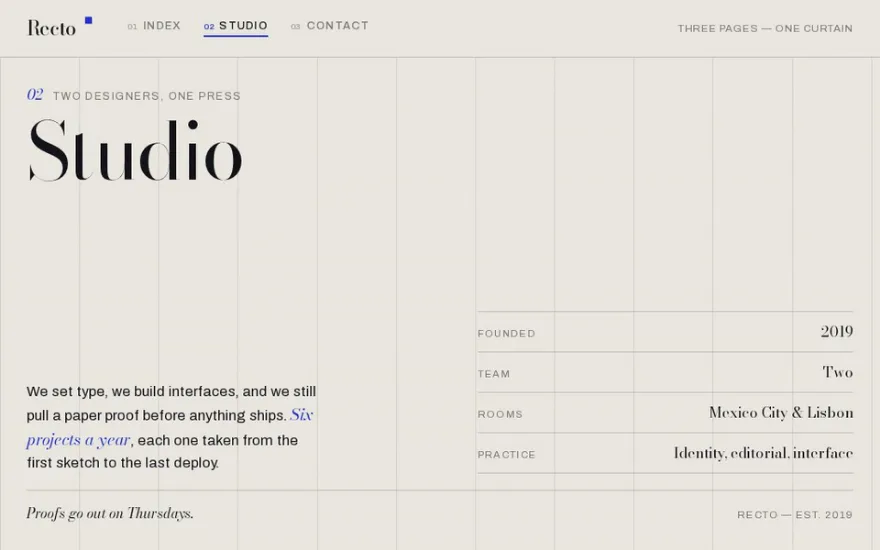
The live example above. Two sheets ride up over the content and carry the name of the next page, while the masthead stays put; the GSAP timeline is organised around the hooks of the Barba sync lifecycle, so it maps onto a Barba project.
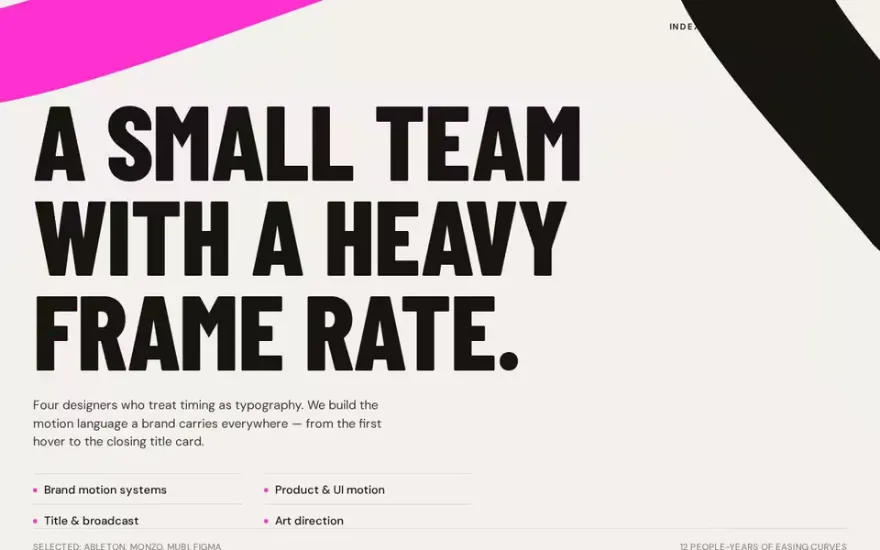
A longer sequence for a studio site, where vertical blocks wipe across, a logo draws itself in the middle and the blocks retreat.
Build it with an AI prompt
The snippet above is the bare idea. BarbaJS Page Transitions is the finished, designed version, and its prompt gives Claude Code, Cursor or any AI coding agent the exact structure, timing and easing to rebuild it in your project. This is how it starts:
# BarbaJS Page Transitions — Two-Sheet Curtain Wipe + Masked Heading Reveal Between Routes
## Goal
Build a small **three-page editorial site** — a fictional press called **Recto** — where the pages are swapped in place, and make the swap the star of the page. A fixed masthead holds the brand and three real nav links (**Index / Studio / Contact**). Clicking one fires the transition: a **blue accent sheet leads a solid ink panel** up from the bottom of the content stage, both travelling in one direction; while the stage is covered the route is replaced underneath; the two sheets keep going **off the top**, uncovering the new page, whose giant `<h1>` **lifts out of a mask** and whose rows **step up** behind it. The ink panel carries the **name and number of the page you are travelling to**, so even a frame grabbed mid-wipe reads as "we are on our way to Studio" rather than as a coloured rectangle.
The whole thing reproduces Barba.js's `sync: true` lifecycle (leave + enter overlap, the outgoing container is dropped mid-transition) with a hand-rolled in-page router — no real multi-page fetch, no framework.
**Three things make this legible, and all three are design decisions, not decoration:**
1. **The masthead never moves.** The curtain covers the content stage only, not the whole viewport. You watch the nav highlight jump to the link you clicked while the page area is being replaced — which is what tells the viewer this is *navigation*, not a loose animation.
2. **Each route has genuinely different content and a different layout** — a numbered work list, a two-column studio statement with a facts table, a huge mail address with a channel grid. If all three routes were the same big word on an empty field, nothing would read as a page change.
3. **The first paint is the first page.** The sheets park *below* the stage and the first route is authored in the HTML, so the very first frame is the Index page, never a full-bleed panel.
## Tech
Vanilla HTML/CSS/JS with ES module imports, in a fresh Vite project. Install and import from npm:
- **`gsap`** (3.x) only. **No GSAP plugins, no ScrollTrigger, no SplitText, no Lenis, no Three.js.**
```js
…
Premium prompt
Unlock this prompt, and every other one
From $99/year, or $139 once for lifetime access. Commercial license included.
Yes, Barba 2 is the current version and works with any bundler or with a script tag. For new projects, also look at the native View Transitions API, which covers simple crossfades and wipes without a library.
Barba.js or View Transitions API?
Barba gives you full control over the timing with GSAP and works the same in every browser. The View Transitions API needs no library and almost no JavaScript, but its animations are CSS on snapshots and support still varies between browsers. Choreographed curtains with several elements are easier in Barba.
Why does my GSAP animation not run after a Barba transition?
The scripts of the new page never ran. Move the initialisation into a Barba hook, and kill the old instances in beforeLeave.
Can I use Barba.js with React or Next.js?
It is not a good fit. Barba swaps raw HTML, which fights the way React renders. In those frameworks, run the GSAP timeline around the router's navigation or use view transitions instead.