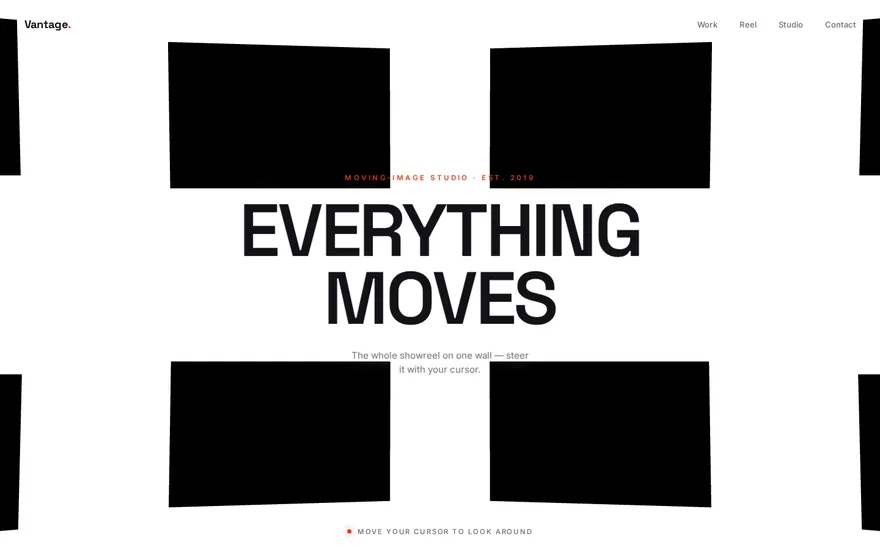
Framecast — 3D Curved Video Wall (Three.js)
Goal
Build a full-viewport, white WebGL scene: a 7×7 grid of 49 flat planes, each textured with a looping muted video, bent into a parabolic wall that curves back toward the viewer on both the horizontal and vertical axes (a shallow satellite-dish / IMAX-screen shape). As the user moves the mouse, the whole wall reacts: every plane gets independent parallax + gentle sinusoidal oscillation, the camera eases its lookAt target around so the wall appears to turn, and a fixed CSS-3D headline ("FRAMECAST") tilts in 3D like a card catching the light. A small lime nav badge ("FRAMES 2024") floats top-center. This is a pure Three.js piece — no GSAP at all; all motion lives in a requestAnimationFrame loop driven by mouse position through eased/lerp-style interpolation.
Tech
Vanilla HTML/CSS/JS with ES module imports. Use three (npm) only — no GSAP, no Lenis. (lil-gui is imported for an optional debug panel that is disabled by default; you can omit it entirely.) Import:
import * as THREE from "three";
// optional, debug only: import GUI from "lil-gui";
Layout / HTML
Almost empty — the canvas is injected by JS into <body>:
<body>
<nav><p>Frames 2024</p></nav>
<div class="header"><h1>Framecast</h1></div>
<script type="module" src="./script.js"></script>
</body>
JS appends the WebGL <canvas> (renderer.domElement) directly to document.body.
Styling
Minimal — the video wall is the whole show; the two DOM overlays sit above it on z-index: 2.
- Global reset
* { margin: 0; padding: 0; box-sizing: border-box; }. html, body { width: 100%; height: 100%; background-color: #fff; overflow: hidden; }— page never scrolls; the white backdrop matches the renderer clear color.canvas { position: fixed; top: 0; left: 0; }— full-bleed, pinned behind the overlays.nav { position: fixed; top: 0; left: 0; width: 100vw; padding: 2em; display: flex; justify-content: center; z-index: 2; }— centered strip at the very top.nav p— the lime badge:text-transform: uppercase; font-family: "Akkurat Trial TT"; font-size: 12px; font-weight: 600; padding: 4px; background-color: #d4f70c;(chartreuse/lime green — the one accent color) plus-webkit-font-smoothing: antialiased; -moz-osx-font-smoothing: grayscale;. Declare the family name exactly as written, with no generic fallback keyword — the "Akkurat Trial TT" webfont is never actually loaded, so the browser falls back to its default serif. At 12px uppercase the serif-vs-sans difference is subtle, but do not append, sans-serif(that would visibly diverge from the original)..header { position: fixed; top: 50%; left: 50%; transform: translate(-50%, -50%); text-align: center; transform-style: preserve-3d; perspective: 1000px; will-change: transform; z-index: 2; }— the 3D-tiltable headline wrapper, dead-center. Theperspectivehere is what makes the JS-drivenrotateX/rotateY/translateZread as real 3D.h1 { text-transform: uppercase; font-family: "Cy Grotesk"; font-size: 7.5vw; letter-spacing: -0.025em; line-height: 1; transform-style: preserve-3d; backface-visibility: hidden; }— one huge word in black (default text color). CRITICAL font detail (this is what the reproduction must match): the CSS names"Cy Grotesk"with NO generic fallback keyword, and that webfont is never loaded. So the browser drops all the way to its default serif, and on screen "FRAMECAST" reads as a heavy SERIF / Didone-style display face — *not* a sans/grotesk. Reproduce that look exactly: setfont-family: "Cy Grotesk";verbatim and do NOT append, sans-serif(or any generic keyword). If you cannot rely on the browser default, target a heavy serif (e.g. a Times/Didone-style face) — never a grotesk sans. The name "Cy Grotesk" describes the font the original author *intended*, not what actually renders.
Three.js effect (the important part — be exhaustive)
Config params (exact values)
const params = {
rows: 7,
columns: 7,
curvature: 5, // horizontal parabola tightness
spacing: 10, // world-unit gap between plane centers (both axes)
imageWidth: 7, // plane geometry width
imageHeight: 4.5, // plane geometry height (~14:9 landscape)
depth: 7.5, // parabola depth divisor
elevation: 0, // vertical world offset applied to y
lookAtRange: 20, // how far the camera target swings with the mouse
verticalCurvature: 0.5 // how much rows tilt/recede top & bottom
};
Scene / camera / renderer
scene = new THREE.Scene()— no lights (unlitMeshBasicMaterial).camera = new THREE.PerspectiveCamera(25, innerWidth / innerHeight, 0.1, 1000)— a long 25° lens (flattens perspective, cinematic).camera.position.set(0, 0, 40).- Renderer:
const renderer = new THREE.WebGLRenderer({ antialias: true });
renderer.setSize(window.innerWidth, window.innerHeight);
renderer.setClearColor(0xffffff); // white backdrop
document.body.appendChild(renderer.domElement);
Curved-wall geometry (exact math — this defines the shape)
For each cell row (0…6) × col (0…6), compute a base position and base rotation.
Position calculatePosition(row, col):
let x = (col - params.columns / 2) * params.spacing; // centered horizontally
let y = (row - params.rows / 2) * params.spacing; // centered vertically
// horizontal parabola: planes farther from center X are pushed toward the camera
let z = (x * x) / (params.depth * params.curvature);
// vertical curvature: top & bottom rows recede with a signed square curve
const normalizedY = y / ((params.rows * params.spacing) / 2); // -1 … 1
z += Math.abs(normalizedY) * normalizedY * params.verticalCurvature * 5;
y += params.elevation; // 0 here
Rotation calculateRotations(x, y) — each plane is angled to stay roughly tangent to the curved wall so it faces the viewer:
const a = 1 / (params.depth * params.curvature);
const slopeY = -2 * a * x; // derivative of the horizontal parabola
const rotationY = Math.atan(slopeY); // yaw: columns turn to face center
const maxYDistance = (params.rows * params.spacing) / 2;
const normalizedY = y / maxYDistance;
const rotationX = normalizedY * params.verticalCurvature; // pitch: rows tilt
Return { x, y, z, rotationX, rotationY }. Set plane.position.set(x, y, z), plane.rotation.x = rotationX, plane.rotation.y = rotationY (base rotation.z = 0).
The video pool (exact paths — do NOT invent placeholder paths)
Declare a pool of 10 clips using these exact source paths (the fixtures are served from /c/threejs-video-gallery/):
const videos = [
{ name: "/c/threejs-video-gallery/v1.mov" },
{ name: "/c/threejs-video-gallery/v2.mov" },
{ name: "/c/threejs-video-gallery/v3.mov" },
{ name: "/c/threejs-video-gallery/v4.mov" },
{ name: "/c/threejs-video-gallery/v5.mov" },
{ name: "/c/threejs-video-gallery/v6.mov" },
{ name: "/c/threejs-video-gallery/v7.mov" },
{ name: "/c/threejs-video-gallery/v8.mov" },
{ name: "/c/threejs-video-gallery/v9.mov" },
{ name: "/c/threejs-video-gallery/v10.mov" },
];
Use these literal /c/threejs-video-gallery/vN.mov paths — .mov extension, absolute-from-root scheme. Do not substitute ./videos/N.mp4 or any invented placeholder: if the paths are wrong the textures 404 and the whole wall collapses to solid black rectangles, which is the single worst failure mode for this piece (the video wall *is* the entire visual payload). The clips must actually load and play — a wall of black planes is a broken reproduction, not an acceptable one.
Video-textured planes (one mesh per cell)
For each cell, createImagePlane(row, col):
const videoData = videos[Math.floor(Math.random() * videos.length)]; // random from the pool of 10, repeats fine
const geometry = new THREE.PlaneGeometry(params.imageWidth, params.imageHeight);
const video = document.createElement("video");
video.src = videoData.name;
video.crossOrigin = "anonymous";
video.loop = true;
video.muted = true; // required for autoplay
video.playsInline = true;
video.play().catch(() => {});
const videoTexture = new THREE.VideoTexture(video);
videoTexture.minFilter = THREE.LinearFilter;
videoTexture.magFilter = THREE.LinearFilter;
// ANTI-BLACK FALLBACK (required): a plane must NEVER render as solid black.
// Start the material with a visible fallback COLOR and only swap in the video
// texture once the clip is confirmed playing. If the clip 404s / errors / never
// buffers, the plane stays a solid non-black color instead of a black rectangle.
const material = new THREE.MeshBasicMaterial({
color: 0xdddddd, // light-grey poster fallback (any visible, non-black tone)
side: THREE.DoubleSide, // planes on the far edges are visible from behind too
});
const showVideo = () => {
material.map = videoTexture;
material.color.set(0xffffff); // white so the video texture shows at true color (map * color)
material.needsUpdate = true;
};
video.addEventListener("loadeddata", showVideo);
video.addEventListener("playing", showVideo);
// on error, do nothing — the grey fallback color remains, never black.
const plane = new THREE.Mesh(geometry, material);
The point of the fallback: with MeshBasicMaterial, a map bound to a video that never loads samples as black (black × any color = black), so you cannot just set a color alongside a broken map. Instead keep the map off until loadeddata/playing fires, so an unloaded/failed plane shows the grey poster color and a loaded plane shows its live video. The correct, faithful result is live video on every plane; the grey is only a safety net so a fixture hiccup degrades to visible grey rectangles rather than a dead black grid. Place it with calculatePosition, then stash per-plane random animation seeds in plane.userData:
plane.userData.basePosition = { x, y, z };
plane.userData.baseRotation = { x: rotationX, y: rotationY, z: 0 };
plane.userData.parallaxFactor = Math.random() * 0.5 + 0.5; // 0.5 … 1.0
plane.userData.randomOffset = { // each -1 … 1
x: Math.random() * 2 - 1,
y: Math.random() * 2 - 1,
z: Math.random() * 2 - 1,
};
plane.userData.rotationModifier = {
x: Math.random() * 0.15 - 0.075, // -0.075 … 0.075
y: Math.random() * 0.15 - 0.075,
z: Math.random() * 0.2 - 0.1, // -0.1 … 0.1
};
plane.userData.phaseOffset = Math.random() * Math.PI * 2; // desync the oscillation
plane.userData.video = video;
updateGallery() clears any existing planes (pause + remove each userData.video, scene.remove), then builds the full rows × columns grid and pushes every mesh to an images[] array and scene.adds it. Call it once at startup.
Mouse tracking (the only input)
let mouseX = 0, mouseY = 0; // normalized -1 … 1, updated on mousemove
let targetX = 0, targetY = 0; // eased followers of mouseX/Y
const lookAtTarget = new THREE.Vector3(0, 0, 0);
// header CSS-3D drivers
let headerRotationX = 0, headerRotationY = 0, headerTranslateZ = 0;
document.addEventListener("mousemove", (e) => {
mouseX = (e.clientX - innerWidth / 2) / (innerWidth / 2); // -1 (left) … 1 (right)
mouseY = (e.clientY - innerHeight / 2) / (innerHeight / 2); // -1 (top) … 1 (bottom)
headerRotationX = -mouseY * 30; // pitch headline up to ±30°
headerRotationY = mouseX * 30; // yaw headline up to ±30°
headerTranslateZ = Math.abs(mouseX * mouseY) * 50; // push headline toward viewer in the corners
});
Render loop animate() (rAF, runs every frame)
- Headline (CSS-3D, not WebGL) — write a transform string and let a CSS transition smooth it:
header.style.transform = `
translate(-50%, -50%)
perspective(1000px)
rotateX(${headerRotationX}deg)
rotateY(${headerRotationY}deg)
translateZ(${headerTranslateZ}px)`;
header.style.transition = "transform 0.5s cubic-bezier(0.215, 0.61, 0.355, 1)";
(The easeOutCubic bezier 0.215, 0.61, 0.355, 1 gives the headline its smooth, slightly lagging tilt.)
- Ease the camera target toward the mouse (
lerpfactor 0.05 — slow, floaty catch-up):
targetX += (mouseX - targetX) * 0.05;
targetY += (mouseY - targetY) * 0.05;
lookAtTarget.x = targetX * params.lookAtRange; // ±20
lookAtTarget.y = -targetY * params.lookAtRange; // inverted so up-mouse looks up
lookAtTarget.z = (lookAtTarget.x * lookAtTarget.x) / (params.depth * params.curvature); // ride the parabola
- Per-plane parallax + oscillation — for every plane, with
time = performance.now() * 0.001:
const mouseDistance = Math.sqrt(targetX * targetX + targetY * targetY); // 0 at center
const parallaxX = targetX * parallaxFactor * 3 * randomOffset.x;
const parallaxY = targetY * parallaxFactor * 3 * randomOffset.y;
const oscillation = Math.sin(time + phaseOffset) * mouseDistance * 0.1; // idle wobble, scaled by how far the mouse is from center
// position drifts from its base
plane.position.x = basePosition.x + parallaxX + oscillation * randomOffset.x;
plane.position.y = basePosition.y + parallaxY + oscillation * randomOffset.y;
plane.position.z = basePosition.z + oscillation * randomOffset.z * parallaxFactor;
// rotation drifts from its base
plane.rotation.x = baseRotation.x + targetY * rotationModifier.x * mouseDistance + oscillation * rotationModifier.x * 0.2;
plane.rotation.y = baseRotation.y + targetX * rotationModifier.y * mouseDistance + oscillation * rotationModifier.y * 0.2;
plane.rotation.z = baseRotation.z + targetX * targetY * rotationModifier.z * 2 + oscillation * rotationModifier.z * 0.3;
Key behaviors that fall out of this math: when the mouse sits dead-center, mouseDistance ≈ 0, so the oscillation and the parallax nearly vanish — the wall settles almost perfectly still. The farther the mouse strays, the more each plane both parallax-shifts (by its own random amount/direction) and gently sways out of phase, giving the wall a living, shimmering depth.
camera.lookAt(lookAtTarget)thenrenderer.render(scene, camera);requestAnimationFrame(animate).
Kick off with updateGallery(); animate();.
Resize handler
On window.resize: camera.aspect = innerWidth / innerHeight; camera.updateProjectionMatrix(); renderer.setSize(innerWidth, innerHeight).
Assets / videos
A pool of 10 short, silent, seamlessly-looping video clips served at /c/threejs-video-gallery/v1.mov … /c/threejs-video-gallery/v10.mov (.mov extension, absolute-from-root paths — see the exact array above). Landscape orientation (roughly 14:9 to fit the 7 × 4.5 planes without obvious cropping), editorial / cinematic subject matter — motion textures, b-roll, moody film-like footage. They are interchangeable: each of the 49 planes picks one at random, so repeats across the grid are expected and fine. All must be muted + playsInline so browsers allow autoplay.
Each plane MUST be textured with an actually-loading, looping, muted clip — this is non-negotiable. The playing videos are the entire visual payload; if they don't load, the composition is nothing but black (or grey-fallback) rectangles.
- Use the exact
.movpaths above; a wrong extension or scheme 404s every clip. - Apply the anti-black fallback from
createImagePlane: while a clip buffers, or if it fails to load, the plane shows a visible non-black color (or a poster frame) — never solid black. A grid of solid-black planes is a failed reproduction. - If genuinely fewer clips are available, reduce the pool and repeat; a handful still reads correctly since placement is random — but they must be real, loading clips, not placeholder paths.
Behavior notes
- Interaction only — nothing animates on load beyond the videos playing; all wall/camera/headline motion is driven by mouse position. With no mouse movement (or mouse at center) the scene is nearly static.
- The playing video textures are the wall's only "life" at rest. Because the wall/camera/headline are frozen until the pointer moves, the *only* thing changing frame-to-frame with the pointer at rest is the video imagery itself. A frame-diff / animation check that never moves the mouse will therefore register motion only from the playing clips — which means broken, absent, or black video textures make the whole piece look dead and static, and a naive "is it animating?" test will read false. So the videos loading and playing is not just cosmetic; it is what proves the piece is alive. Get the clips loading (exact
.movpaths + anti-black fallback) before worrying about anything else. - Desktop-oriented and WebGL-heavy: 49 simultaneous
VideoTextures is expensive; the piece assumes a pointer device (no touch/scroll handling) and a capable GPU. No reduced-motion handling in the original. - No GSAP, no ScrollTrigger, no scroll hijacking — the page itself never scrolls (
overflow: hidden); the only easing is the hand-rolledlerp(factor 0.05) and the CSS transition on the headline. - The
DoubleSidematerial means edge planes that turn away from the camera still show their (mirrored) video on the back — intentional, keeps the curved wall solid-looking from oblique angles.