
Asset ORB
What it does
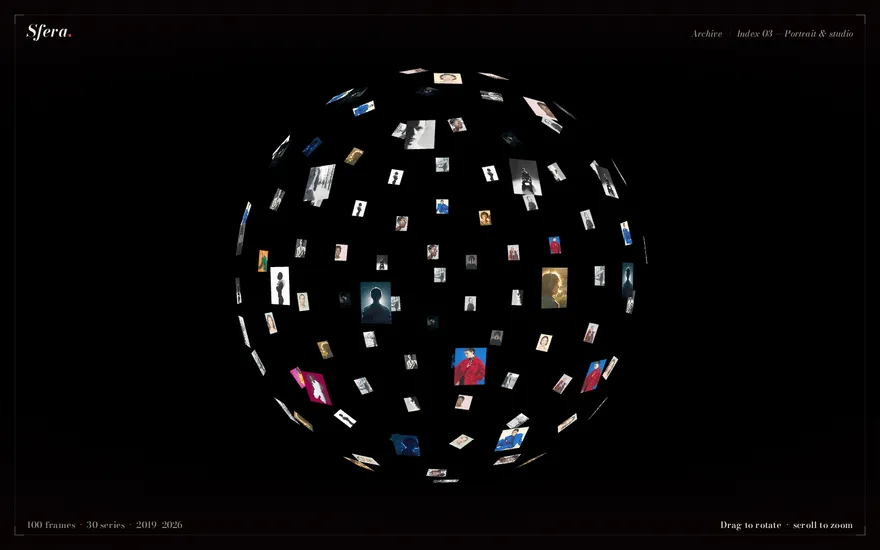
A WebGL sphere built from 100 image planes distributed via a Fibonacci-sphere layout, each plane textured with a random editorial photo. Three.js OrbitControls let the user drag to rotate the orb and scroll to zoom, with damping/inertia for smooth momentum.
How it's built
| Category | 3d-webgl |
|---|---|
| Tech | three |
| Complexity | page |
| Performance cost | heavy |
| Mobile-safe | desktop-first |
How it works
Asset Orb is an archive you can hold in your hand. On a pitch-black page, a hollow sphere made of small photographs floats in the middle of the screen. Drag it and it spins in any direction, over the poles included, and when you let go it keeps gliding before it slowly comes to rest. Scroll or pinch and you move closer to the shell or back out. Through the gaps between the front tiles you can see the backs of the photos on the far side, which is what makes it read as a sphere rather than a flat collage.
This is a pure Three.js piece. There is no GSAP, and nothing moves on its own.
Placing photos evenly on a sphere
Spreading points evenly over a sphere is harder than it sounds. Stepping through latitude and longitude piles points up at the poles and leaves the equator sparse. The orb uses a golden-spiral distribution instead: the points wind from one pole to the other along a spiral whose turns are spaced so that every tile gets roughly the same area around it. Each point then receives a plane, and the plane is turned to face outwards from the centre, so every photo looks at the viewer when it comes round to the front.
Every plane picks a photograph at random from a pool, and its size adapts to the picture: landscape images keep their full width, portraits their full height, so nothing is cropped and the shell gets a varied, editorial texture. The material is unlit and double-sided, which is why the far side shows through mirrored instead of disappearing.
The interaction
The drag, the inertia and the zoom limits come from Three.js orbit controls with damping switched on. Damping only works if the controls are updated on every frame, so the render loop runs continuously and applies a little of the remaining motion each time; that produces the long, floaty glide after release.
Where it gets hard
The scene waits until every texture has loaded before it starts drawing, so the orb appears complete in one go instead of filling in tile by tile. That is a deliberate choice, but it means a slow connection sees a black page for a moment, so a loading state or a poster is worth adding.
Performance and mobile
Each photo is its own mesh with its own texture, which means many small draw calls and a lot of image memory. On a desktop GPU that is comfortable. On phones it is the main cost, together with rendering at the full device pixel ratio, so for mobile it is worth capping the pixel ratio, using fewer or smaller images, or combining the photos into one texture atlas. Touch rotation and pinch zoom work out of the box. Because the wheel is captured for zooming, the orb belongs in a full-screen section rather than in the middle of a scrolling page.
Rebuild it with AI
This component's prompt is part of the paid library. Below you can read how it starts; the full prompt, the exact structure, timing and easing an AI agent needs to rebuild the effect, unlocks with any paid plan, yearly or lifetime.
# Asset Orb — Draggable WebGL Image Sphere
## Goal
Build a full-viewport, pitch-black WebGL scene containing a single **"orb" made of 100 small photo planes** arranged on the surface of a sphere via a **Fibonacci-sphere (golden-spiral) distribution**, every plane textured with one of 30 editorial photographs picked at random. The user **drags to spin the orb** (with damped inertia, so it keeps gliding after release) and **scrolls/pinches to zoom** between a near and far limit. A fixed HTML nav ("ORB") and footer ("[ ARCHIVE BEYOND REALITY ]") float over the canvas. This is a pure Three.js piece — **no GSAP at all**; all motion comes from OrbitControls damping inside a `requestAnimationFrame` loop.
## Tech
Vanilla HTML/CSS/JS with ES module imports. Use **`three` (npm) only** — no GSAP, no Lenis, no other libraries. Import:
```js
import * as THREE from "three";
import { OrbitControls } from "three/addons/controls/OrbitControls.js";
```
## Layout / HTML
Nearly empty — the canvas is injected by JS:
```html
…
Premium prompt
Unlock this prompt, and every other one
From $99/year, or $139 once for lifetime access. Commercial license included.
See pricing Or start with the free set Already bought? Sign in
New components in your inbox
One email a week, only when new components ship, each with its live demo and prompt.